Buy me a DrinkEther Coffee (5$)
Introduction to Chaos Engineering Exploration: Developping a Resilient Web Application
Published on:
2024-04-28
#ChaosEngineering #SoftwareReliability #WebDevelopment #Django #vuejs #agile-development #scrum-methodology #resilience
Table of Contents
1. Introduction
Chaos Engineering is rapidly becoming a cornerstone in enhancing software reliability. In this blog post, I’ll introduce the engineering degree graduation internship project I worked on, which revolved around developing a file and secret sharing web application for the purpose of exloring Chaos Engineering principles to improve system resilience. The journey included web development, containerization, Deployment on K8S with monitoring (Test/Dev cluster & AKS) and finally experimenting with Chaos Enginering.
The project is published on my GitHub, check it out here.
The project is published on my GitHub, check it out here.
2. Why This Project?
Modern software systems are increasingly more distributed and more cloud based and with that comes inherent complexity (This was researched as early as 1986 by Frederick P. Brook Jr. in his research paper No silver bullet - essence and accidents of software engineering). Traditional methods like manual testing or reactive troubleshooting often fall short in identifying mishaps of software engineering. Chaos engineering emerged to solve that by relying on chaos theory.
This project aimed to:
This project aimed to:
- Build a resilient web application for file and secret sharing.
- Demonstrate the effectiveness of Chaos Engineering in identifying and addressing hidden system weaknesses.
3. Project Objectives
The project was structured to achieve the following objectives:
- Develop a secure web application with robust user management, file, and secret sharing features.
- Containerize the application to ensure portability and consistency.
- Deploy the application on Azure Kubernetes Service (AKS) for production readiness with the use of Key Vault and monitoring services.
- Implement Chaos Engineering experiments to test and enhance the application's resilience.
4. Project Planning
Global Use Case Diagram
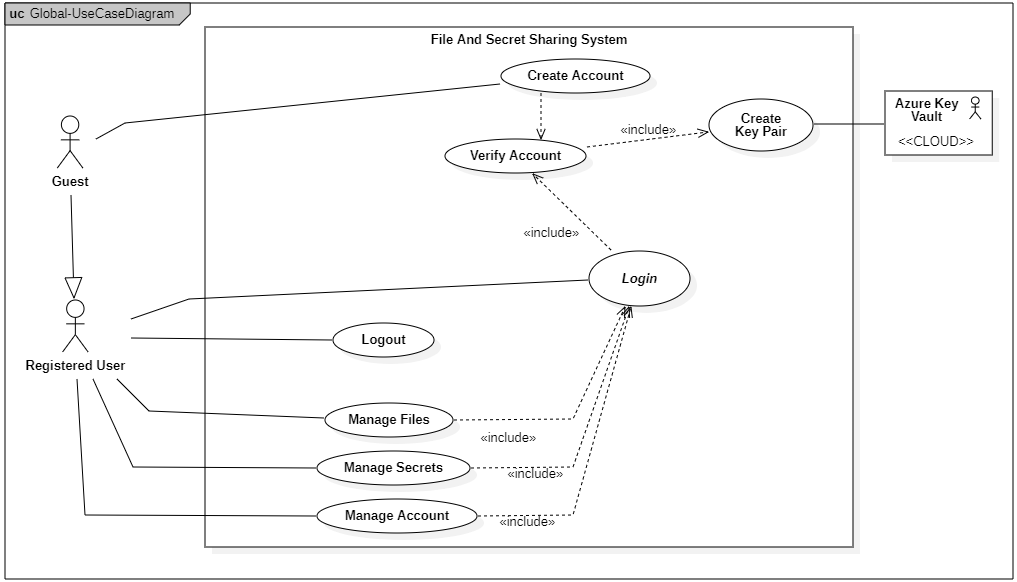
Actors
- Guest: A user who is not logged into the system. Primary interaction: They can create an account.
- Registered User: A user who has created an account in the system and has access to various features.
- Primary interactions: Login, Manage files, manage secrets, manage their account, and log out.
- Azure Key Vault (Cloud): A cloud service that the system interacts with to create and manage cryptographic key pairs for the sake of encrypting secrets. No direct interaction with human actors.
Use Cases
- Create Account (Guest): The guest can create a new account to become a registered user. This process includes the creation of a key pair via the Azure Key Vault, which is necessary for secure file and secret management.
- Verify Account (Guest): The system includes a step for account verification. This use case is triggered as part of the account creation process.
- Login (Registered User): A registered user logs into the system. This use case is crucial as it allows access to the system’s core functionality like file and secret management.
- Logout (Registered User): After interacting with the system, the registered user can log out to terminate the session.
- Manage Files (Registered User): Once logged in, the user can perform file-related actions (e.g., uploading, downloading, or sharing files).
- Manage Secrets (Registered User): Similarly, the user can manage secrets (e.g., store, retrieve, or update sensitive information).
- Manage Account (Registered User): Users can modify their account set- tings or update personal information after logging in.
5. Project Management Approach
The whole project was carried out in sprints using the Scrum methodology. Below is an overview of the key releases/sprints:
| Release | Sprint | Description |
|---|---|---|
| Release1 | Sprint1 | Development of the User Management feature. |
| Release1 | Sprint2 | Development of the Secret Management feature. |
| Release1 | Sprint3 | Containerization of the application so far. |
| Release2 | Sprint4 | Setup of a test Kubernetes cluster and deployment of containerized services. |
| Release2 | Sprint5 | Development of the File Management feature, requiring a running Kubernetes cluster. Feature containerized and deployed on the test cluster. |
| Release2 | Sprint6 | Setup of monitoring tools (Prometheus, Grafana) using Istio for service mesh capabilities. |
| Release3 | Sprint7 | Setup of Azure Kubernetes Service (AKS) and managed Istio. Managed Prometheus and Grafana were integrated for monitoring. Azure Key Vault was implemented and deployment of all created manifests in AKS. |
| Release3 | Sprint8 | Setup of a chaos engineering environment to test the resilience of the system, with experiments conducted to identify and address system weaknesses. |
6. What's Next?
Now that we have the plans ready, we will be dlving into developing the User Management and Secret Management Features. You can read about them in here.