Buy me a DrinkEther Coffee (5$)
High Availability Deployment With Traefik and Docker Swarm
Published on:
2023-10-07
#traefik #docker #docker-swarm #load-balancing #fault-tolerance #cloud-native #reverse-proxy #https-termination #high-availability
Table of Contents
1. The Architecture of the Solution
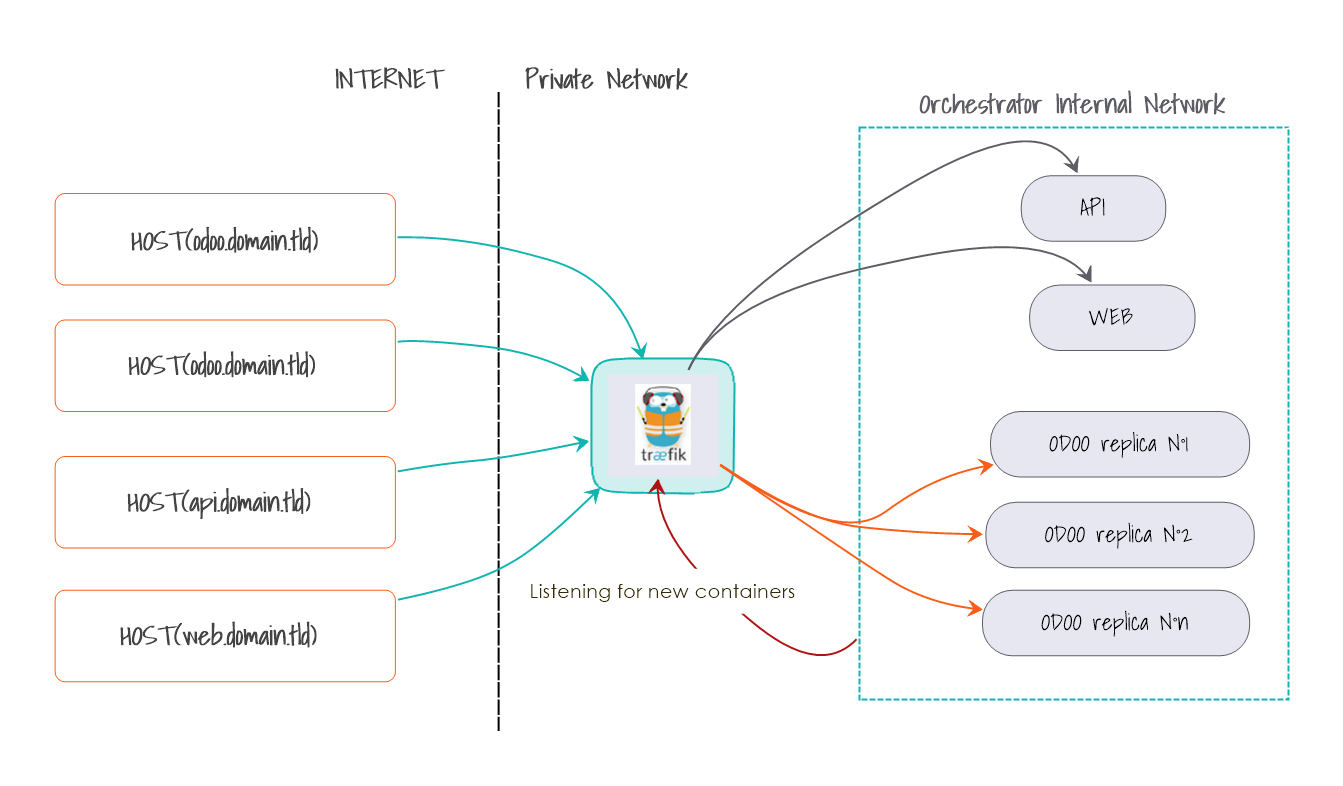
The image above shows how the traefik load balancer works with docker swarm. The traefik load balancer is a reverse proxy that is used to route requests to the appropriate service. It is also used to manage the certificates of the services that are using it to provide what https termination. Traefik is, also, seamlessly integrated with the docker daemon and the swarm mode as a result, which means that it can automatically detect the services that are running in the swarm and route the requests to them.
One example to show its power is that when we add replicas to a service using docker swarm, traefik will automatically detect them and route the requests to them. Its combination with docker swarm makes it even more powerful and easy to use. as swarm is also capable of replacing services that are down with replicas that are healthy.
One example to show its power is that when we add replicas to a service using docker swarm, traefik will automatically detect them and route the requests to them. Its combination with docker swarm makes it even more powerful and easy to use. as swarm is also capable of replacing services that are down with replicas that are healthy.
2. How to implement it ?
First, we need docker, docker-compose and docker swarm installed on our machine. Next, we need to create a docker-compose file that will contain the services that we want to deploy.
Here is what the docker-compose file looks like:
version: '3.8'
services:
db:
    image: postgres
    environment:
        POSTGRES_USER: manager
        POSTGRES_PASSWORD: password123
        POSTGRES_DB: postgres
    volumes:
    - "./postgresql/data:/var/lib/postgresql/data"
    networks:
    - net1
    healthcheck:
        test: ["CMD-SHELL", "pg_isready -U manager"]
        interval: 5s
        timeout: 5s
        retries: 5

odoo:
    image: odoo:latest
    depends_on:
    - db
    environment:
        POSTGRES_USER: manager
        POSTGRES_PASSWORD: password123
        POSTGRES_DB: postgres
    volumes:
    - ./odoo/data_dir:/var/lib/odoo
    - ./odoo/conf:/etc/odoo
    deploy:
        mode: replicated
        replicas: 3
    networks:
    - net1
    labels:
    - "traefik.enable=true"
    - "traefik.http.routers.odoo.rule=Host(`odoo.m0d4s.me`)"
    - "traefik.http.services.odoo.loadbalancer.server.port=8069"

traefik:
    image: traefik:latest
    command:
    - "--api.insecure=true"
    - "--providers.docker=true"
    - "--entrypoints.web.address=:80"
    - "--entrypoints.websecure.address=:443"
    - "--entrypoints.websecure.http.tls=true"
    - "--certificatesResolvers.myresolver.acme.tlsChallenge=true"
    ports:
    - "80:80"
    - "8080:8080"
    - "443:443"
    volumes:
    - /var/run/docker.sock:/var/run/docker.sock
    - ./certs:/odoo-certs
    networks:
    - net1
    labels:
    - "traefik.http.routers.traefik.rule=Host(`traefik.m0d4s.me`)"
    - "traefik.http.routers.traefik.service=api@internal"
    - "traefik.http.routers.odoo-https.rule=Host(`odoo-sec.m0d4s.me`)"
    - "traefik.http.routers.odoo-https.entrypoints=websecure"
    - "traefik.http.routers.odoo-https.tls=true"
    - "traefik.http.routers.odoo-https.tls.certificates[0]=/odoo-certs/odoo.crt"
    - "traefik.http.routers.odoo-https.tls.certificates[1]=/odoo-certs/odoo.key"

networks:
    net1:
The docker-compose file above contains 3 services:
- db : a postgresql database that will be used by odoo
- odoo : the odoo service that will be load balanced by traefik
- traefik : the traefik load balancer
The db service is a simple postgresql database that will be used by odoo. It is configured to use a volume to store its data and a network to communicate with the other services. It also has a healthcheck that will check if the database is up and running. If it is not, the service will be restarted. This is useful when we want to deploy the services in a swarm. The swarm will automatically restart the service if it is down.
The odoo service is the service that will be load balanced by traefik. It is configured to use a volume to store its data (Make sure the permissions of volume on the host side contain the write for others ‘chmod -R o+w ./postgresql/’) and a network to communicate with the other services. It also has a label that will tell traefik to route the requests to it. The label is composed of 3 parts:
- traefik.enable: true : this tells traefik to enable the routing to this service.
- traefik.http.routers.odoo.rule: Host(odoo.m0d4s.me) : this tells traefik to route the requests to this service if the host is odoo.m0d4s.me.
- traefik.http.services.odoo.loadbalancer.server.port=8069: : this tells traefik to use port 8069 to communicate with this service.
The traefik service is the traefik load balancer. It is configured to use a volume to store its certificates and a network to communicate with the other services. It also has a label that will tell traefik to route the requests to it. The label is composed of 7 parts:
- traefik.http.routers.traefik.rule=Host(traefik.m0d4s.me) : this tells traefik to route the requests that have the host traefik.m0d4s.me to this service.
- traefik.http.routers.traefik.service=api@internal : this tells traefik to route the requests to the api@internal service.
- traefik.http.routers.odoo-https.rule=Host(odoo-sec.m0d4s.me) : this tells traefik to route the requests that have the host odoo-sec.m0d4s.me to this service
- traefik.http.routers.odoo-https.entrypoints=websecure : this tells traefik to route the requests to the websecure entrypoint
- traefik.http.routers.odoo-https.tls=true: this tells traefik to use tls for this service
- traefik.http.routers.odoo-https.tls.certificates[0]=/odoo-certs/odoo.crt: this tells traefik to use the certificate odoo.crt for this service
- traefik.http.routers.odoo-https.tls.certificates[1]=/odoo-certs/odoo.key: this tells traefik to use the certificate odoo.key for this service
One more thing, the traefik service is configurable through these options:
- --api.insecure=true : this tells traefik to use the api in insecure mode
- --providers.docker=true : this tells traefik to use docker as a provider to auto discover services
- --entrypoints.web.address=:80 : this tells traefik to use the port 80 for the web entrypoint
- --entrypoints.websecure.address=:443 : this tells traefik to use the port 443 for the websecure entrypoint
- --entrypoints.websecure.http.tls=true : this tells traefik to use tls for the websecure entrypoint`
3. How to Deploy It ?
To deploy the services, we need to run the following command:
docker swarm init
docker stack deploy -c docker-compose.yml traefik_lb
# If you need to change the number of replicas of the odoo service, you can run the following command:
docker service scale traefik_lb_odoo=5
This will deploy the services in a docker swarm. To check the status of the services, we can run the following command:
docker service lsThis will show the status of the services. If the status of the services is up, then we can access the services using the hosts that we configured in the docker-compose file.
4. How to Access The Services ?
To access the services, we need to add the hosts that we configured in the docker-compose file to the /etc/hosts file. To do that, we can run the following command:
sudo echo '127.0.0.1 traefik.m0d4s.me odoo.m0d4s.me odoo-sec.m0d4s.me' >> /etc/hostsNow, we can access the services using the hosts that we configured in the docker-compose file.
5. How to Test It ?
To test the services, we can run the following command:
curl -k https://127.0.0.1 -H "Host: odoo-sec.m0d4s.me"This will show the response of the odoo service. If the response is ok, then the services are working fine.
6. How to Remove The Stack ?
To remove the stack, we can run the following command:
docker stack rm traefik_lb7. How to Remove The Swarm ?
To remove the swarm, we can run the following command:
docker swarm leave --force8. Conclusion
The traefik load balancer is a powerful tool that can be used to load balance services. It is also easy to use and configure, seamlessly integrated with a multitude of containerization engines such as docker, combining it with the swarm mode of docker provides a scalable and fault-tolerant infrastructure for your applications.